


How to Optimize Your Website with Google Search Console
Introduction to Google Search Console
Google Search Console is an indispensable tool for webmasters, SEO professionals, and website owners aiming to enhance their online presence. This free service, provided by Google, allows users to monitor and manage their website’s performance in Google’s search results. Understanding the functionality of Google Search Console is crucial for anyone looking to improve their website’s visibility and traffic.
At its core, Google Search Console acts as a bridge between Google and website owners, providing essential insights into how a website is interpreted by the search engine. Users can analyze various performance metrics, including search traffic, indexing status, and potential issues affecting their site. This tool enables webmasters to ascertain how their website appears in search results, offering valuable feedback that can inform optimization strategies.
One of the key features of Google Search Console is its ability to track website performance over time. By examining critical data points such as click-through rates, impressions, and average rankings for specified keywords, webmasters can assess the effectiveness of their SEO efforts. Furthermore, the platform highlights any errors encountered while seeking to index the site, which can directly impact search visibility. Addressing these issues promptly can play a significant role in maintaining a healthy website ecosystem.
Additionally, Google Search Console allows users to submit sitemaps, aiding Google in understanding the structure of a website and enabling more efficient crawling. The tool also provides data on user experience, alerting webmasters to mobile usability issues and other factors influencing site performance. By leveraging the insights offered by Google Search Console, webmasters can make informed decisions to boost their site’s health, visibility, and overall search performance.
How to Set Up Google Search Console
Setting up Google Search Console is a crucial step for webmasters and SEO specialists aiming to enhance their website’s visibility and performance. The process begins by creating a Google account if you do not already possess one. This account will be used to manage various Google services, including Google Search Console. Once you have your account, navigate to the Google Search Console homepage.
Upon landing on the homepage, the next step is to add a property, which refers to the website you want to monitor. Click on the ‘Add Property’ button, which will prompt you to enter your website’s URL. It is essential to ensure that the URL you provide matches the exact version of your site you use, including the HTTPS protocol if applicable.
After entering your website URL, Google requires verification to confirm that you are the rightful owner of the property. Google Search Console offers several verification methods to streamline this process. The HTML file upload method involves downloading a verification file and uploading it to the root directory of your website. Alternatively, you can choose the meta tag method, where Google provides a unique tag to insert into the head section of your homepage.
If your website already utilizes Google Analytics, you can opt for the Google Analytics method for verification, which simplifies the process further if you have the correct permissions set in your account. Each verification method has its benefits, so choose the one that best suits your website management practices. Once verified, you will gain access to an array of tools and reports in Google Search Console vital for monitoring your website’s search performance and overall health.
Understanding Your Dashboard
The Google Search Console (GSC) dashboard serves as a crucial tool for website owners and digital marketers, providing essential insights into a site’s performance in Google search results. Upon accessing the GSC, users are greeted with a user-friendly interface designed to offer an overview of vital metrics and alerts for their website. This section will guide you through the primary components of the dashboard, ensuring effective navigation.
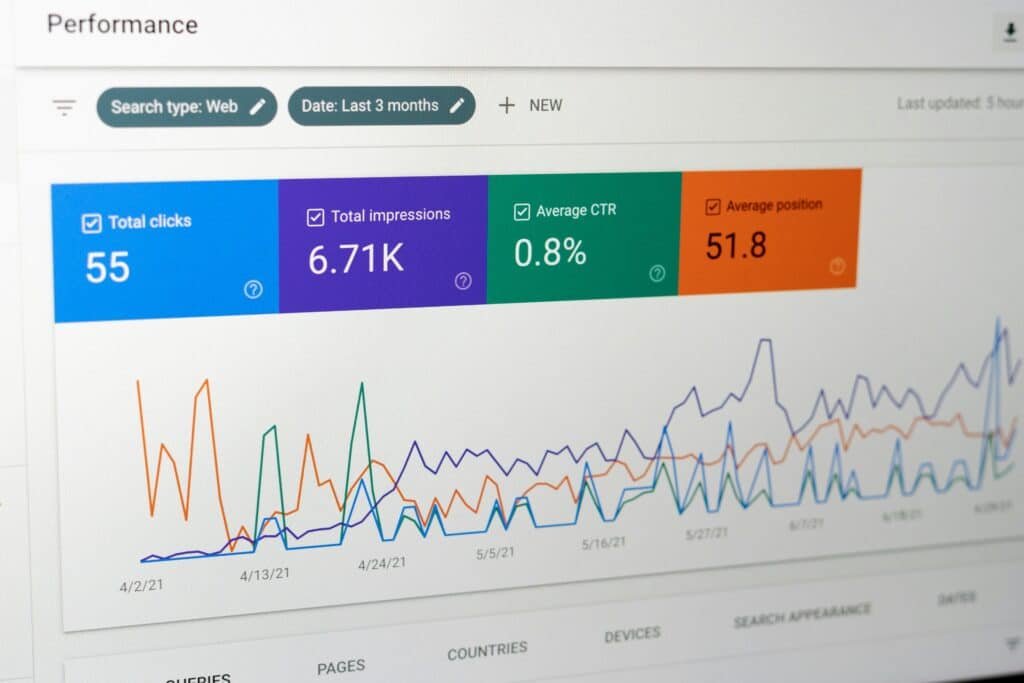
At the top of the dashboard, the performance report is prominently featured, revealing key statistics such as total clicks, impressions, average position, and click-through rate (CTR). These metrics allow users to gain immediate insight into how their website is performing on search engines. A graphical representation of performance trends over time is available, making it easier to identify fluctuations and seasonal variations that may affect site visibility.
Below the performance section, the coverage report highlights any indexing issues, presenting information on URLs that are successfully indexed, as well as those that encountered errors or warnings. This area is crucial for identifying pages that may not be appearing in search results due to technical issues, such as server errors or redirects. Users should pay close attention to these details, as resolving coverage problems can significantly improve a website’s performance.
Another essential component of the dashboard pertains to enhancements, which include opportunities to improve user experience and visibility. This section provides insights into mobile usability, Core Web Vitals, and structured data, essential elements in optimizing a website for both search engines and visitors. Effectively utilizing these components ensures that your website is not only visible but also provides a valuable experience for users.
By familiarizing yourself with the layout and primary components of the Google Search Console dashboard, you can navigate this invaluable platform more effectively, which is key to maximizing your website’s potential in search engine results.
Interpreting Performance Data
The Performance Report in Google Search Console is an invaluable tool for understanding how your website is performing in Google search results. This report provides key metrics that can help you assess the effectiveness of your search engine optimization (SEO) efforts. The core metrics include clicks, impressions, click-through rate (CTR), and average position. By analyzing these metrics, you can gain insights into both the visibility of your website and user engagement.
Clicks represent the number of times users have visited your site from search results. This metric is crucial as it indicates the effectiveness of your content in attracting visitors. Impressions, on the other hand, reflect the number of times your website’s links appeared in the search results, regardless of whether users clicked on them. By comparing clicks to impressions, you can calculate the CTR, which is a vital metric that shows the percentage of users that clicked your link after seeing it. A low CTR could suggest that your title or meta description needs to be more engaging or relevant to the search queries.
The average position metric indicates where your website ranks on average for queries. A higher position (closer to 1) typically correlates with better visibility and higher click-through rates. However, understanding trends over time is also essential. By examining the performance data over various timeframes, you can identify patterns that correlate with changes made to your website or shifts in search behavior. This analysis can reveal opportunities for improving your website’s performance, helping you implement optimizations to enhance visibility and user engagement.
In conclusion, effectively interpreting the performance data in Google Search Console is crucial for understanding your site’s performance in search results. By focusing on clicks, impressions, CTR, and average position, along with analyzing trends, you can identify actionable insights that drive better optimization outcomes.
Exploring Coverage Reports
Coverage reports in Google Search Console are essential tools that provide website owners with a comprehensive overview of how their pages are indexed by Google. These reports categorize page status into four main types: errors, valid with warnings, valid, and excluded. Understanding these classifications is crucial for troubleshooting issues related to your website’s visibility in search results.
When a page is marked with an error, it indicates a significant issue that prevents the page from being indexed. Common examples include server errors or issues related to redirects. It is vital to address these promptly, as errors not only hinder visibility but can also negatively impact user experience. By analyzing the specific error code and following Google’s provided guidance, website owners can often resolve these issues effectively.
Pages that are valid with warnings are indexed but may contain issues that could impact performance. These warnings could involve mobile usability problems or issues with structured data. While these pages are visible in search results, addressing the warnings is advisable to enhance user experience and ensure full optimization for search engines.
Valid pages, which are successfully indexed without any issues, indicate that the content is accessible and ready for visibility in search results. Maintaining a high number of valid pages is crucial for SEO success, and regular monitoring of these reports helps assure that the site remains search-friendly.
Finally, excluded pages are those that Google has intentionally not indexed. This may be due to a variety of reasons such as a ‘noindex’ directive or because the content is deemed duplicate or low-quality. Identifying and understanding why pages are excluded can inform content strategy and help in optimizing future pages for inclusion.
Overall, navigating the coverage reports in Google Search Console allows website owners to track the health of their site, identifying and resolving issues promptly to enhance their online visibility.
Understanding Enhancements and Mobile Usability
The Enhancements tab in Google Search Console serves as a crucial tool for webmasters aiming to optimize their websites for better performance and user engagement. This section will delve into specific features under this tab, notably, Accelerated Mobile Pages (AMP) and mobile usability. Both attributes are instrumental not only for improving the user experience but also for enhancing search rankings.
Accelerated Mobile Pages (AMP) is a framework designed to create fast-loading mobile pages. Given the increasing reliance on mobile devices for browsing, implementing AMP can significantly reduce loading times, thus minimizing bounce rates. The user expects quick access to content; delayed load times can lead to frustration, ultimately affecting user retention. Moreover, a well-optimized AMP implementation can positively impact search engine rankings, as Google favors pages that load quickly and deliver a seamless browsing experience.
Mobile usability extends beyond mere load times. This feature assesses how user-friendly a website is on mobile devices. Factors such as text size, button spacing, and viewport configuration play vital roles in determining mobile usability. A website that is challenging to navigate or read on a mobile device can dissuade users from visiting, leading to diminished traffic and lower search rankings. Utilizing the mobile usability report provided in Google Search Console offers valuable insights into areas that require improvement.
Incorporating both AMP and mobile usability strategies not only assists in creating a smoother experience for users but also aligns with Google’s ongoing commitment to prioritize mobile-friendly sites in its search results. Understanding and leveraging these enhancements allows website owners to stay competitive in an increasingly mobile-centric digital landscape.
Using the URL Inspection Tool
The URL Inspection Tool in Google Search Console is a powerful resource that allows webmasters to analyze individual URLs of their website. This tool provides insights into how Google indexes a specific page, making it an essential feature for troubleshooting issues related to indexing and visibility. By entering a URL from your site into the tool, users can obtain critical data, including the current indexing status, any potential errors that may prevent proper indexing, and the last time Google crawled the page.
To utilize the URL Inspection Tool, access Google Search Console and navigate to the ‘URL Inspection’ feature located in the left-hand menu. Upon entering the desired URL, the tool performs a comprehensive check and displays essential information. Any indexing issues, such as crawl errors or problems related to mobile usability, will be highlighted, providing a clear understanding of the issues at hand.
Moreover, the tool grants insights into how Google perceives the page’s content. For instance, it indicates whether a page is indexed, whether it has any associated rich results, and the canonical version recognized by Google. This information is invaluable for webmasters aiming to enhance their website’s performance in search results. Understanding the ways in which Google views individual pages can help in optimizing them for better indexing.
Furthermore, the URL Inspection Tool allows users to request re-indexing. If changes have been made to a page, or if an issue has been resolved, webmasters can utilize this feature to prompt Google to recrawl the URL. This ability to rectify problems quickly and efficiently makes the tool indispensable for maintaining optimal site performance and visibility in search engine results.
Setting Up and Monitoring Alerts
Setting up alerts in Google Search Console is a fundamental step for any website owner who aims to maintain optimal site performance and ensure a healthy online presence. By configuring alerts for critical issues, such as indexing errors and security problems, you can proactively identify and address any concerns before they escalate into significant challenges. This proactive approach not only enhances user experience but also supports your site’s ranking in search engines.
To initiate the alert setup, log in to your Google Search Console account. Once in the dashboard, navigate to the “Settings” tab located at the bottom left corner of the screen. Here, you will find the “Notifications” option. Google Search Console allows you to receive notifications via email, ensuring you are promptly informed about any alerts relevant to your website.
When you set the alerts, focus on the types of issues critical to your site’s integrity. Indexing errors indicate that Google is having trouble accessing certain pages, which could hinder your site’s visibility in search results. By receiving real-time notifications on these errors, you can quickly initiate corrective actions, such as optimizing your sitemap or resolving server issues.
Moreover, security issues represent a significant risk to your website, as they can lead to data breaches and loss of user trust. By integrating security alerts into your monitoring setup, you can be notified of any potential hacking attempts or malware vulnerabilities. These timely updates facilitate swift action, enabling you to safeguard your website effectively.
In conclusion, configuring alerts in Google Search Console is not merely a technical task but a strategic aspect of website management. By staying informed of critical issues as they arise, you maintain control over your online presence, ensuring that your website remains both functional and secure. Embrace this proactive measure to bolster your website’s performance and user experience over time.
Conclusion and Next Steps
In concluding our discussion on leveraging Google Search Console, it is essential to highlight the critical role it plays in optimizing your website. Throughout this guide, we have explored various features of the platform, including performance tracking, index coverage, and the importance of keyword analysis. Each of these elements provides valuable insights that are vital for managing a successful digital presence. Understanding these features allows website owners and digital marketers to pinpoint areas needing improvement and capitalize on opportunities for growth.
Consistency in utilizing Google Search Console is key for ongoing website optimization. Regularly monitoring the performance metrics helps ensure that your website remains aligned with the latest SEO practices and search engine algorithms. By interpreting the results effectively, you can make informed decisions that enhance user experience and ultimately improve search rankings. The data provided through the console serves as a guide for structured adjustments that will keep your website competitive in a constantly evolving digital landscape.
Moreover, digital marketing is inherently dynamic; techniques and strategies that work well today may not yield the same results in the future. Thus, relying solely on initial analyses without regular check-ins could diminish your online presence. Leveraging Google Search Console continuously will provide you with current information, enabling you to make timely updates to your SEO strategies. As you move forward, invest time in familiarizing yourself with the tools available in Google Search Console and incorporate their findings into your digital marketing strategies. This proactive approach will significantly enhance your website’s performance and enhance its visibility among search engine users.


